

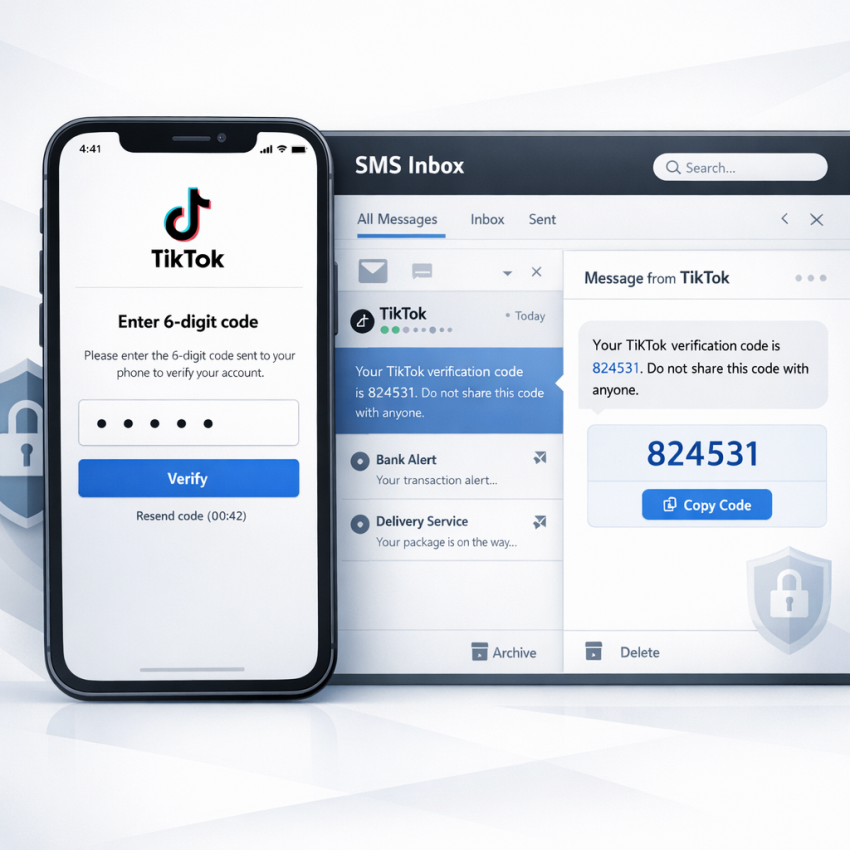
If you need a TikTok verification SMS in 2026, the process is usually straightforward when the setup is correct: choose a suitable number, match the country format, request the code once, and watch the incoming message panel carefully. Where users usually run into trouble is not the idea of SMS verification itself, but the details around region selection, number formatting, session timing, and repeated resend attempts.
This guide explains a practical workflow for using SmsPva to receive a TikTok OTP, complete phone verification, and troubleshoot the most common failure points. It is written for creators, marketers, account managers, privacy-focused users, and anyone trying to solve a TikTok verification code not received problem without relying on a personal SIM.
It also helps to set expectations clearly. Receiving a TikTok code is one part of account verification, not a promise of account approval, recovery success, or long-term account outcomes. What you can control is the verification workflow: using the right service path, selecting a compatible country, entering the number properly, and keeping the session stable until the code arrives.
What TikTok verification SMS means in 2026
A TikTok verification SMS is a one-time password sent by text message to confirm that you control the phone number entered during a TikTok action. Depending on the situation, TikTok may request this code when you:
- create a new account
- log in from a new device or browser
- recover access after a password or security issue
- add or change a phone number
- confirm a sensitive settings change
- respond to unusual-login or suspicious-activity checks
That makes SMS verification relevant far beyond first-time signup. In practice, many users need to receive TikTok OTP messages repeatedly as part of normal account management. For individual users, the goal may be privacy. For teams and agencies, it is often about account separation and cleaner operations. For others, the immediate issue is simple: their regular carrier number is not receiving the code reliably, or the message is arriving too late.
Using a virtual number can be useful in those cases because it separates verification activity from your main phone line. Instead of tying every social platform to your personal mobile number, you use a service built for OTP receipt and service-based activation workflows.
When it makes sense to use a virtual number for TikTok
A virtual number for TikTok is not only for anonymity. In many legitimate workflows, it is mainly about keeping account verification organized and reducing exposure of a primary number.
Privacy-focused verification
If you do not want your everyday phone number attached to every account you test or manage, a separate verification number creates distance between your main identity and a platform action. This is common for creators, freelancers, and users who prefer not to connect personal contact details to every service they use.
Work and personal separation
Marketers, social media managers, and agencies often need a cleaner boundary between client accounts and private use. A temporary number for TikTok can make that separation easier, especially when multiple accounts are handled by one person or one team.
Backup when standard delivery fails
Some users start looking for receive SMS online for TikTok solutions only after a carrier-based verification attempt fails. If your main number is not getting the OTP, or the delivery is inconsistent, a service-built workflow may be easier to manage.
Region-specific account workflows
Country choice matters in phone verification. If your TikTok setup is tied to a specific region, you may want a number flow that aligns with that country code rather than using your home SIM for every case.
These scenarios do not remove the need for accuracy. You still need to choose the right country, use the number in the correct format, and complete the OTP step promptly.
Before you start: what to prepare
Before opening TikTok’s phone verification screen, prepare the workflow first. This small step reduces failed attempts and helps you avoid wasting time or balance.
- Have access to your SmsPva account: Sign in at smspva.com before requesting a code.
- Check balance: Most activations are pay-per-use, so make sure your account is funded if needed.
- Know your target country: Decide which country code matches the TikTok workflow you are about to complete.
- Keep the verification window ready: Open TikTok to the screen where it asks for a phone number, but do not request the code until your number is active.
- Use a stable session: Avoid switching devices, networks, or browser contexts midway through verification.
A simple but effective setup is to keep TikTok open in one tab or device and the SmsPva order page open in another. That makes it easier to copy the number, monitor incoming SMS, and enter the code before it expires.
Step by step: how to receive a TikTok verification code with SmsPva
- Create or log in to your SmsPva account.
Go to SmsPva and sign in. If you are new to the platform, create an account first so you can manage orders, view incoming messages, and access support if needed. - Add funds if your workflow requires it.
Check your balance before starting the TikTok verification step. This prevents interruptions once you are ready to request the code. - Choose the relevant service flow.
Inside the dashboard, look for the most relevant service option for TikTok-related verification. Service naming can change over time, so the key point is to use the platform’s service-based ordering flow rather than picking a random number without context. - Select the country carefully.
Pick a country that fits the TikTok phone field you plan to use. Country mismatch is one of the most common reasons a code request fails or behaves inconsistently. - Order the number.
Activate or purchase the number through SmsPva. Once assigned, copy it exactly as shown. Do not retype it manually unless necessary. - Open TikTok and enter the number.
Go to the screen where TikTok asks for a phone number. Confirm the country selector matches the country of the number you received, then paste or type the number in the expected format. - Request the verification code.
Tap or click the option to send the SMS. Then return to the SmsPva message area and wait for the incoming OTP. - Read the code in your SmsPva dashboard.
When the message arrives, copy the latest code exactly as displayed. - Enter the OTP in TikTok promptly.
Paste the code into TikTok and confirm the action before the verification window expires.
Quick example workflow
A typical use case looks like this: you open TikTok on a phone or browser, reach the phone verification step, log in to SmsPva in another tab, choose the appropriate country and service flow, order the number, paste it into TikTok, request the SMS, and monitor the incoming message in the SmsPva panel until the OTP appears.
This is simple on paper, but small mistakes matter. Most failed attempts come from entering the wrong country code, requesting multiple codes too quickly, or using an old verification screen that has already timed out.
How long does a TikTok OTP usually take to arrive?
There is no single guaranteed delivery time for every country, session, or account state, but in many cases the code arrives quickly when the setup is correct. If it does not appear immediately, that does not automatically mean the number is unusable or the provider failed. Delivery can be affected by:
- country and route availability at that moment
- how TikTok is handling the current verification session
- whether the number was entered in the correct format
- whether you requested too many codes in a short period
- network and device consistency during the attempt
The best practice is to request one code, wait through a normal delivery window, and avoid panicked retries. Repeated resend attempts often create more confusion than clarity.
How to improve delivery success and avoid common TikTok OTP mistakes
If your TikTok OTP is not arriving, there is usually a specific cause. A more methodical approach works better than guessing.
1. Match the country to the verification flow
Before buying a number, confirm that the chosen country fits the TikTok account flow you are trying to complete. If the phone field, app context, or account setup points to one region and the number points to another, delivery may fail or the request may not validate cleanly.
2. Check the number format carefully
This is one of the most common errors. Make sure TikTok’s country selector matches the number country, do not duplicate the country code, and remove extra spaces or symbols if the form does not require them.
3. Avoid stale pages and expired sessions
If you opened the verification screen earlier and left it idle, start fresh. Old login pages and expired flows often create problems that look like SMS delivery issues even when the real cause is session timeout.
4. Do not spam the resend button
Users often request another code too quickly, then lose track of which message is current. In some cases, repeated requests can trigger temporary delays or invalidate earlier attempts. Send one request, wait, and only retry after the original attempt has clearly expired.
5. Keep the session consistent
Try not to switch from Wi-Fi to mobile data, from one browser to another, or from one device to another in the middle of verification. Consistency helps reduce friction.
6. Use the newest OTP only
If several codes are sent, only the latest one may be valid. When the message appears in SmsPva, copy the most recent code and enter it immediately.
7. Confirm you are in the right TikTok workflow
Signup, login recovery, suspicious activity review, and phone-number changes can behave differently. If one path is stuck, restart the exact action you are trying to complete rather than jumping across several different screens.
Common reasons a TikTok verification code is not received
When users search for TikTok verification code not received, the actual cause is usually one of these:
- Wrong country selected: the number and TikTok phone field do not match.
- Formatting error: the number was pasted incorrectly or the country code was added twice.
- Old verification session: the app or page timed out before the code request was completed.
- Too many resend attempts: rate limiting or confusion around which code is valid.
- Inconsistent environment: IP, device, or session context changed midway through the process.
- Expired code: the SMS arrived, but the OTP was entered too late.
Looking at the problem this way is useful because it gives you a checklist. Instead of repeating the same failed attempt, you can change one variable at a time and retry with a cleaner setup.
Why SmsPva fits TikTok verification workflows
What makes SmsPva practical for this task is not just access to virtual numbers. It is the workflow structure around them.
- Service-based ordering: You choose a verification path within a dedicated dashboard instead of trying to manage random numbers manually.
- Country selection: You can align the number to the TikTok region context you are working with.
- Centralized message view: Incoming OTP messages appear in one place, which makes it easier to monitor and react quickly.
- Help resources: If an activation does not behave as expected, the SmsPva Help page gives you a starting point for troubleshooting.
- Workflow extensions: For account-isolation setups, the platform also offers HQ Proxy.
That combination is useful for both simple one-time verification and more organized account operations. Instead of treating OTP receipt as a random event, you are working inside a process designed for verification tasks.
Advanced use cases: creators, marketers, and multi-account teams
Once you move beyond a single signup, verification becomes an operational task. This is where structured workflows matter more than the number alone.
Creators
A creator may want to keep a personal account tied to a real SIM while using a separate verification flow for a brand, side project, or campaign account. This helps reduce overlap between private and public-facing activity.
Marketers and social managers
If you manage several brands or test multiple account setups, it helps to keep notes on which number, country, and session were used for each verification attempt. Even a simple spreadsheet can make troubleshooting much easier.
Agencies and account teams
Teams benefit from a repeatable process: one account context, one number path, one session record. A clean internal log might include account name, target country, date, verification result, and any notes on formatting or delivery timing.
Privacy-conscious users
Some users simply want to avoid exposing their main phone number to additional platforms. In that case, a virtual number acts as a layer of separation between personal communications and platform verification.
For more advanced environments, some users also separate accounts by browser profile, email identity, and IP route. If that applies to your setup, tools like HQ Proxy can support cleaner account isolation alongside SMS verification.
Practical reliability notes and realistic expectations
No SMS verification provider can honestly promise that every TikTok code will arrive instantly in every region and every account state. Delivery depends on platform behavior, country routing, timing, session quality, and user input accuracy.
What you can reasonably expect from a good workflow is:
- a clear way to obtain a suitable number
- visibility into incoming messages
- country-based selection options
- a repeatable process for retries and troubleshooting
That is a more useful standard than vague claims about guaranteed success. In practice, verification works best when the number choice, country format, and TikTok session all align cleanly.
FAQ: TikTok verification SMS with SmsPva
Can I use a virtual number for TikTok verification in 2026?
Yes, many users look for a virtual number when they need a separate path for phone verification, privacy, work account separation, or troubleshooting OTP delivery problems. The important part is choosing the right country and entering the number exactly as TikTok expects.
Why is my TikTok verification code not arriving?
The most common causes are country mismatch, incorrect number formatting, repeated resend attempts, expired sessions, or inconsistent device and network conditions during the request.
How long does it take to receive a TikTok OTP with SmsPva?
Timing varies by country, route availability, and TikTok’s current verification handling. In many cases the message arrives quickly, but it is still best to allow a reasonable wait window before retrying.
What country should I choose for TikTok SMS verification?
Choose a country that matches the TikTok phone field and the account workflow you are completing. A mismatch between account context and phone number country is a frequent cause of failure.
Can I use SmsPva without exposing my personal phone number to TikTok?
That is one of the main reasons users choose a virtual number. It can help keep your personal mobile line separate from platform verification tasks.
What should I do if I entered the TikTok number in the wrong format?
Restart the attempt with the correct country selector and number format. Check that you did not add the country code twice and that there are no extra spaces or missing digits.
Does using a proxy help with TikTok verification workflows?
For some advanced account-isolation setups, a stable proxy can help keep session context more consistent. If you manage separated environments, HQ Proxy may be relevant.
What is the difference between a one-time verification number and a reusable workflow?
A one-time number solves one verification event. A reusable workflow is broader: it includes account records, country planning, browser or device consistency, and a repeatable way to troubleshoot OTP problems across multiple verifications.
Can agencies or multi-account teams use SmsPva for account separation?
Yes. Agencies and account managers often use structured verification workflows to keep client accounts separate, document number usage, and reduce confusion during login or recovery steps.
Where can I find SmsPva help resources if my code does not arrive?
You can start with the SmsPva Help page for troubleshooting guidance and next steps.
Final checklist before you verify TikTok with SmsPva
- Log in to SmsPva first.
- Check your account balance if funding is required.
- Choose the correct service flow.
- Select a country that matches your TikTok verification scenario.
- Copy the assigned number exactly as shown.
- Make sure TikTok’s country selector matches the number country.
- Request one code only when you are fully ready.
- Keep the session stable while waiting.
- Use the newest OTP immediately after it arrives.
- If something fails, troubleshoot methodically before retrying.
Used this way, SmsPva fits neatly into broader account verification workflows: it gives you a separate number path, a clear message panel for OTP receipt, and support resources when a verification step does not work as expected. If you are ready to begin, start from the SmsPva homepage and set up the verification attempt carefully before requesting the code.